What your students see
Students get their questions in two places: an issue in their repository and a PDF. They never see the answers.
The assessment issue
After a run, an issue called GrillMyCode Questions (main) appears in the student's Issues tab. It is assigned to the student and pinned to the top of the list. With a submission tag, the tag's name is in the title instead, for example GrillMyCode Questions (tag: complete), and each tag gets its own issue.
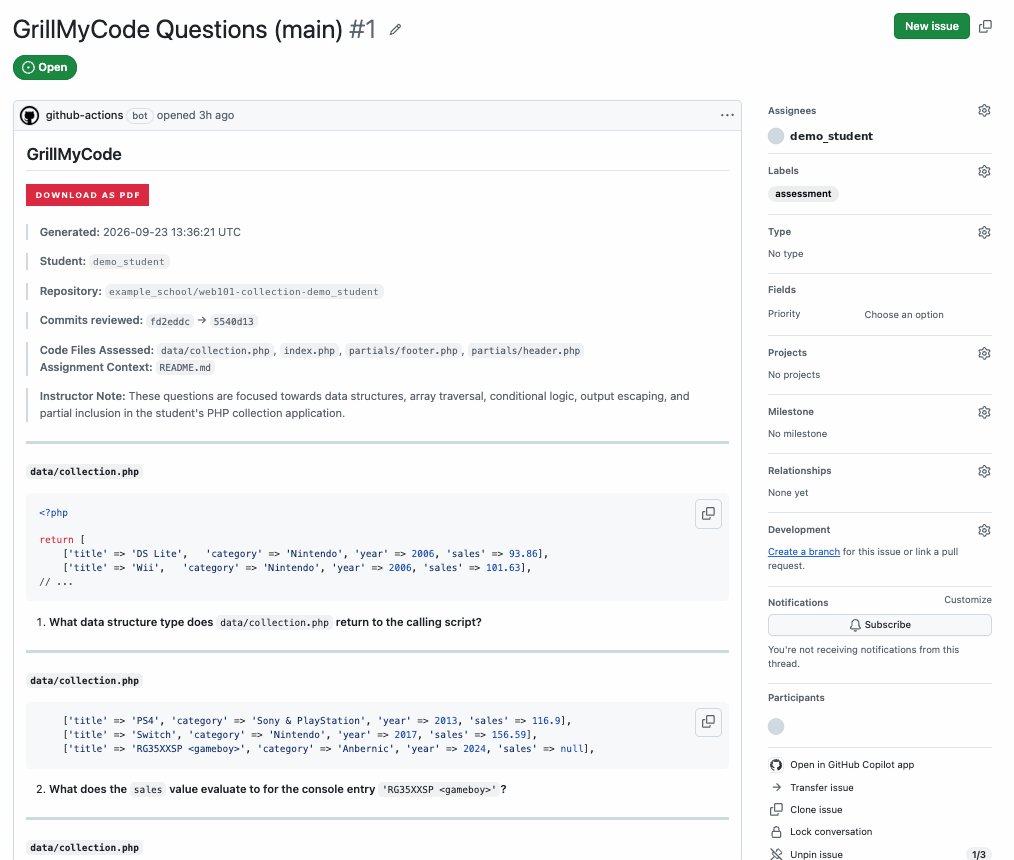
The top of the issue has a Download as PDF button and a short header:
- when the questions were generated
- the Instructor Note: a one-sentence summary of your instructions, if you wrote any
- which files were assessed, and any assignment brief that was used
Each question comes after it, with the name of the file it's about and a short snippet of the student's own code.
Questions held back
Before posting, GrillMyCode checks that no question gives away its own answer. When it can't be sure, it leaves that question out of the student's copy and the issue says how many were held back. Your private answer key always has the full set.
When the questions change
Each new run replaces the questions in the same issue. The link stays the same, and there's always exactly one current set. A comment is added each time, noting the commit the new questions came from.
The PDF
The PDF has the same questions, laid out for printing or offline reading. Its download link is at the top of the issue and doesn't change between runs, so it always gives the latest version. In a private repository, students need to be signed in to GitHub to download it.
What to tell your students
Students don't need to set anything up, but they do need to know where their questions will appear. Adapt one of these for your assignment instructions.
If questions are generated on every push:
This assignment uses GrillMyCode. A few minutes after you push your work to
main, an issue called GrillMyCode Questions appears in your repository's Issues tab, with questions about your code. Be ready to answer them. The questions are regenerated each time you push, so always use the latest set.
If students submit with a tag:
This assignment uses GrillMyCode. When your work is finished and pushed to
main, submit it by running:A few minutes later, an issue called GrillMyCode Questions (tag: phase1-complete) appears in your repository's Issues tab, with questions about your code. Running
gh student submiton its own does not do this; you need to push the tag.To resubmit after further changes, move the tag and push it again with
git tag -f phase1-completeand thengit push --force origin phase1-complete. Every resubmission is recorded.
phase1-complete is only an example. The tags are whatever you set up in the workflow: one tag such as done, or one per milestone such as phase1 and phase2. Replace phase1-complete above with your own tag, and list every tag students need to use. See Choosing a trigger.
Go deeper: The assessment issue and PDF: the issue's format, file names, length limits and duplicate handling