Tracking assessed repositories
With a class of 30 or more, it helps to see at a glance which students have questions, and who has resubmitted. This page covers three ways to do that.
See which repositories have questions
A search, with no setup
This GitHub search lists every repository in your organization with a current set of questions. Replace your-org with your organization's name:
org:your-org is:issue is:open label:assessment
It reads the live state, so it's always accurate, and it needs no setup at all.
Repository labels
With the private answer key set up, GrillMyCode can also label each student repository once questions exist. You can then see the labels right in your organization's repository list, without searching. Each repository gets two labels:
- A topic. A
grillmycodetag on the repository. You can filter by it, with the searchorg:your-org topic:grillmycode. - A note in the description. GrillMyCode adds
· 🔥 GrillMyCode: 20 questionsto the end of the description. It shows the number of questions, and it appears in every list view.
Labels need the answer-key token because GitHub doesn't let a workflow's built-in permissions change a repository's topics or description. Labels are turned on by Label assessed repositories in the organization list in the Workflow Wizard's Instructor step, which is ticked by default. Untick it to leave repositories unlabelled.
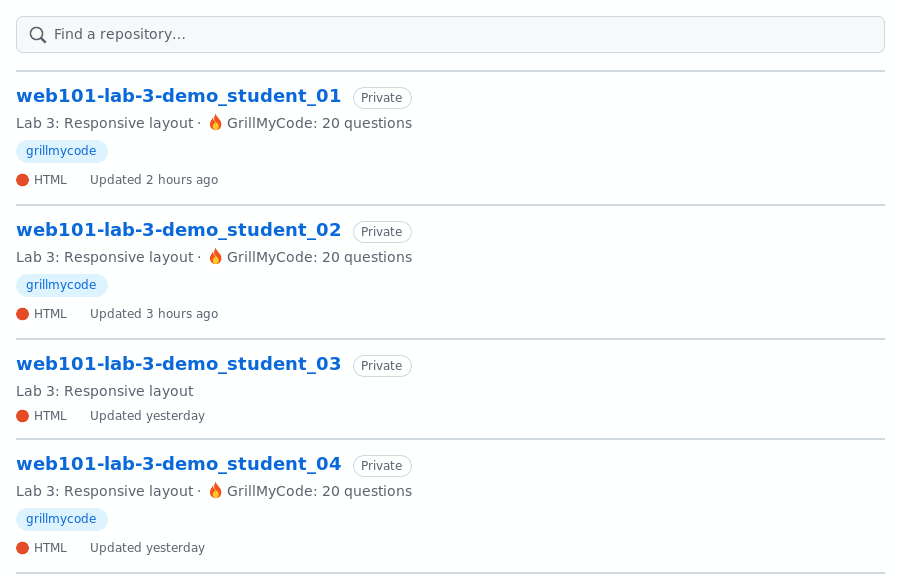
GrillMyCode is careful with these labels:
- It keeps any topics you've added yourself.
- It replaces its own old note rather than adding another one.
- It leaves a description alone if adding the note would make it too long for GitHub.
Labels stay on a repository once they're added, so they show which students have had questions at some point. The search above shows who has questions right now.
GitHub shows topics in some repository list views and not others. The description note shows everywhere.
Spotting resubmissions
When students submit with a tag, they can resubmit by moving the tag to a newer commit and pushing it again. GrillMyCode never blocks this, but with the private answer key set up, it records every resubmission where students can't see or change it:
- A warning in the assessment. The student's
questions.mdin the private repository says it's a resubmission, for example "this is the 3rd submission of phase1". - A log. A
submissions.mdfile in the tag's folder lists every run: when, what started it, who, and which commit. - The old questions. Each set of questions a resubmission replaced is kept in a
history/folder.
This matters because students see their questions (though never the answers), so re-pushing a tag is also a way to get a fresh set. By comparing the old sets with the new one, you can tell whether a student submitted new work or went looking for easier questions.
Only the student's own submissions count. A run you start yourself from the Actions tab is listed in the log, but it isn't counted as a resubmission.
Go deeper: Repository label internals: how the labels are written · Instructor repository internals: the resubmission record · Recipe: Repository labels