Showing questions in VS Code
GrillMyCode Companion is a free extension for VS Code, the code editor. It shows a student's questions in the editor, beside the lines of code they ask about.
It's optional. The issue and PDF work the same with or without it, and nothing in your workflow changes: the extension reads the questions issue GrillMyCode already posts.
What students get
- A list of their questions, grouped by file.
- A jump to the code. Selecting a question opens the file and highlights the lines it asks about.
- The whole question, shown under the list with the code as it was when the question was written.
- A warning when the code has changed since the questions were written, because the highlighted lines may no longer be the right ones.
The extension doesn't write questions and doesn't show answers.
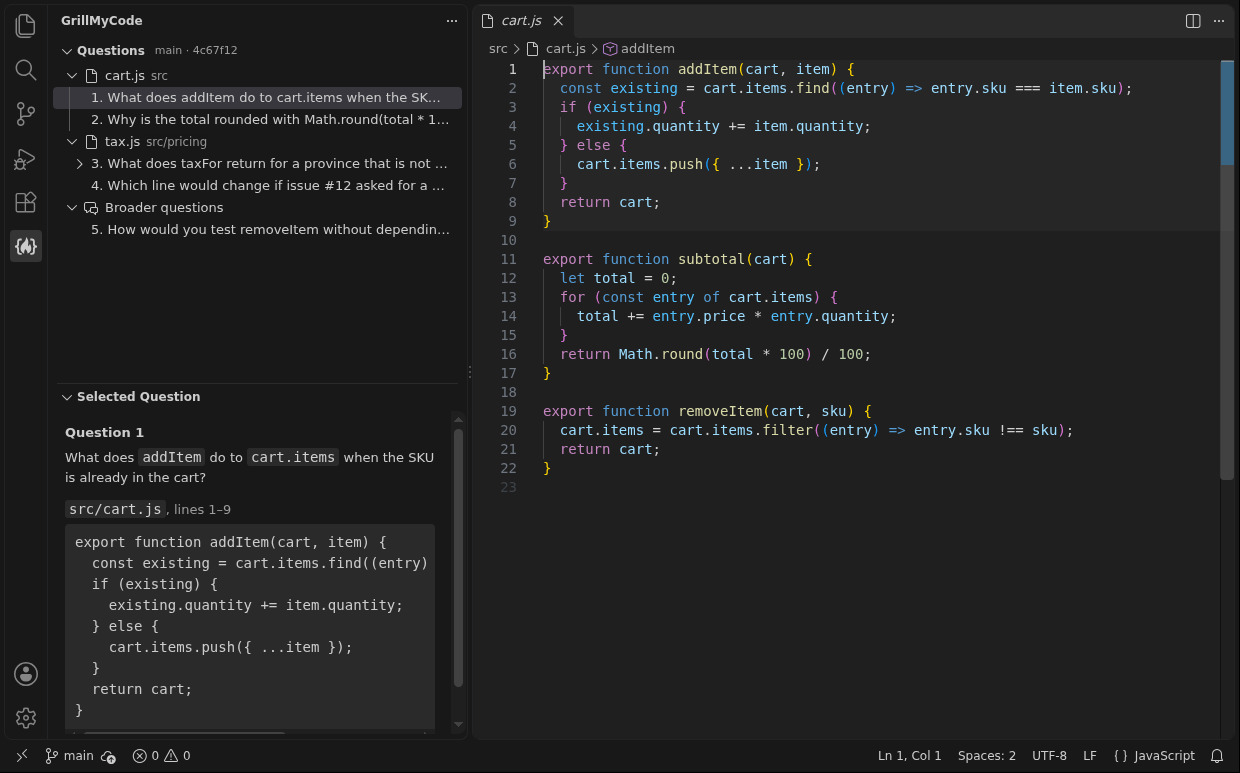
Add it to an assignment
Students get the extension the way they get your starter code: from the assignment's template repository. Two small files do it, one for each way students open their work. Add either or both.
For GitHub Codespaces
A codespace is an editor that runs in the browser, set up from the repository. Create .devcontainer/devcontainer.json in the template with this content:
{
  "customizations": {
    "vscode": {
      "extensions": ["GrillMyCode.grillmycode"]
    }
  }
}
If the template already has this file, add "GrillMyCode.grillmycode" to its list of extensions instead. The extension is installed when a student's codespace is created.
For VS Code on the student's own computer
Create .vscode/extensions.json in the template with this content:
{
  "recommendations": ["GrillMyCode.grillmycode"]
}
When a student opens the assignment's folder, VS Code offers to install the extension. The student has to accept the offer, and confirm that they trust the publisher.
Neither file is assessed. GrillMyCode leaves out editor and codespace settings, like the rest of your template.
Students who have already accepted
A student's repository is a copy of the template at the moment they accepted, and these two files don't reach it afterwards. Students without them, and students in empty-repository assignments, can install the extension themselves in a minute. Your questions in VS Code has the steps.
What to tell your students
Adapt this for your assignment instructions:
You can read your GrillMyCode questions inside VS Code, beside your code. Install the GrillMyCode Companion extension if VS Code hasn't already offered it, select the GrillMyCode icon at the side of the window, and sign in to GitHub. Your questions appear once you've pushed and GrillMyCode has finished. Instructions: Your questions in VS Code.
What students are asked to allow
The extension reads the questions through the student's GitHub account, so each student signs in to GitHub from VS Code once. The sign-in asks for access to the student's repositories. That is broader than the extension needs, but it's the only permission GitHub offers for reading a private repository this way.
The extension uses it to read the questions issue and nothing else. It changes nothing on GitHub, and it collects no usage data.
Good to know
- It needs a recent VS Code, on a computer or in a codespace. It doesn't run in the lightweight editor GitHub opens when you press . on a repository.
- It follows the branch the student has checked out. With submission tags a repository can hold several sets of questions, and the student can choose which one to see.
- Questions don't refresh on their own. After a later push, the student selects Refresh Questions.
Go deeper: The VS Code extension: how it finds the questions, which set it shows, and what the sign-in is used for