Version: Next (unreleased)

Instructor Setup

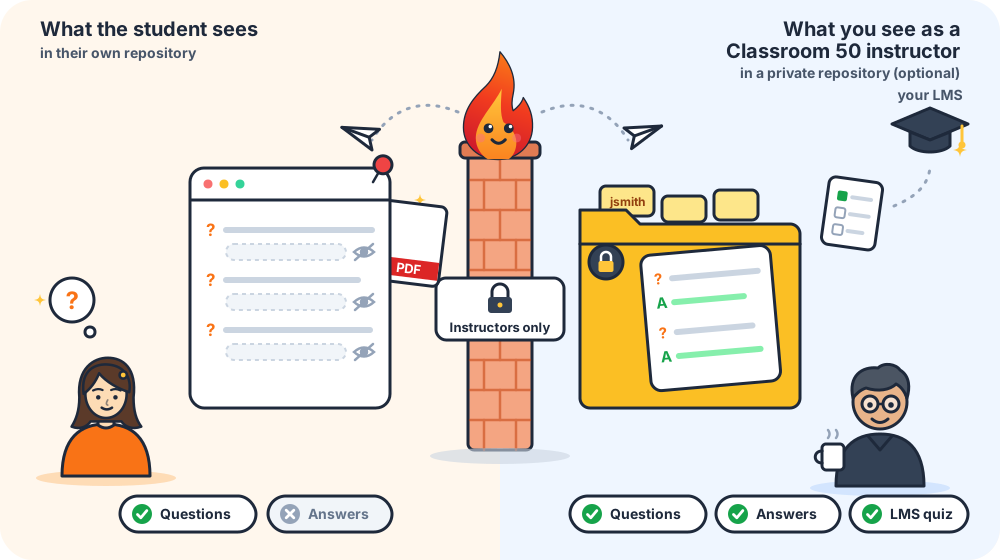
This page walks through everything an instructor needs to do to enable private instructor repository delivery — the feature that automatically stores a full question-and-answer assessment copy for every student in a private repository that only instructors can access.

:::info Classroom 50 assignment repositories only Instructor repository delivery works only in the student repositories Classroom 50 creates when a student accepts an assignment. The action identifies the assignment and the student from Classroom 50's repository naming (see how the assignment and student are identified), so the feature is not available for any other repository — setting instructor_repo_token there only produces a warning. Everything else GrillMyCode does works the same with or without Classroom 50. :::

Setup is split into two phases: a one-time org setup that you do once for your whole classroom organisation, and a per-assignment setup that you do once for each new assignment.


Phase 1 — One-time org setup

Do this once. Every assignment you create afterwards picks it up automatically.

Step 1 — Create an instructor PAT

Create a Personal Access Token that the action will use to create and write to the private instructor repository. The token must belong to an account that has permission to create repositories in the organisation (an org owner, or a member if the org allows member repo creation).

  1. Go to GitHub → Settings → Developer settings → Personal access tokens → Tokens (classic).
  2. Click Generate new token (classic).
  3. Give it a descriptive name, e.g. GrillMyCode instructor delivery.
  4. Set an expiry that suits your retention policy (e.g. 1 year).
  5. Select the repo scope (the full checkbox — this covers creating private org repos and reading/writing file contents) and the workflow scope (required to commit GitHub Actions workflow files into the instructor repository, and to keep them up to date afterwards).
  6. Click Generate token and copy the value immediately.

Fine-grained PAT (more restrictive)

  1. Go to GitHub → Settings → Developer settings → Personal access tokens → Fine-grained tokens.
  2. Click Generate new token.
  3. Set Resource owner to your organisation.
  4. Under Organisation permissions, grant Administration: Read and Write (required to create new repositories).
  5. Under Repository permissions, grant Contents: Read and Write (required to write assessment files) and Workflows: Read and Write (required to commit GitHub Actions workflow files into the instructor repository, and to keep them up to date afterwards).
  6. Click Generate token and copy the value.
note

Fine-grained tokens require the organisation to allow them. Check Org → Settings → Personal access tokens → Allow access via fine-grained personal access tokens.

:::caution Already have an instructor PAT? Tokens created before the workflow scope became a requirement need updating. Every delivery now rewrites .github/workflows/generate-lms-quiz.yml when the action ships a newer copy, and GitHub refuses any write under .github/workflows/ from a token without that scope — so a repo-only token produces a Could not update .github/workflows/generate-lms-quiz.yml … warning on every student push, and the instructor repository stays on its original quiz-generation code.

Assessments are still delivered — the sync warns rather than fails — but the fixes never arrive. To fix it, edit the existing classic token (Settings → Developer settings → Tokens (classic) → your token → Regenerate/Edit) and tick workflow alongside repo, or add Workflows: Read and Write to a fine-grained token. Update the INSTRUCTOR_REPO_TOKEN org secret if regenerating produced a new value. :::


Step 2 — Add the token as an org-level Actions secret

Adding the secret at the organisation level means every student repository inherits it automatically — you never need to add it manually to individual repos.

  1. Go to your organisation → Settings → Secrets and variables → Actions.
  2. Click New organisation secret.
  3. Name: INSTRUCTOR_REPO_TOKEN
  4. Value: paste the PAT you created in Step 1.
  5. Repository access: choose All repositories (or Private repositories if you prefer narrower scope).
  6. Click Add secret.

Phase 2 — Per-assignment setup

Do this once each time you create a new Classroom 50 assignment. It takes about one minute.

Step 3 — Add the workflow to the assignment's starter repo

Open the starter/template repository for the assignment (the repo registered with gh teacher assignment add --template <owner>/<repo>). Add the following file:

.github/workflows/grill-my-code.yml

name: GrillMyCode

on:
push:
branches: ["main", "master"]
workflow_dispatch:

# A new push cancels any run still in progress for the same branch,
# so only the latest commit is ever assessed (see FAQ).
# Do not modify this setting unless you have a compelling reason to.
concurrency:
group: grillmycode-${{ github.workflow }}-${{ github.ref }}
cancel-in-progress: true

jobs:
generate-questions:
runs-on: ubuntu-latest
timeout-minutes: 15
permissions:
contents: write # gmc-assessments release + PDF asset
issues: write # assessment issue
steps:
- uses: actions/checkout@v6
with:
fetch-depth: 0 # full history required for diff resolution

- uses: NSCC-ITC-Assessment/GrillMyCode@v1
with:
github_token: ${{ secrets.GITHUB_TOKEN }}
api_key: ${{ secrets.OPENROUTER_API_KEY }}
# If desired, uncomment this input and edit to use a different one —
# any model from https://openrouter.ai/models (provider/model-name).
# ai_model: "google/gemini-3.5-flash-lite"
num_questions: "20"
instructor_context: |
Assignment 1 — Python functions. Prioritize conceptual
questions about parameter design and return values, and at
least one error identification question about what happens
when an invalid argument is passed.
instructor_repo_token: ${{ secrets.INSTRUCTOR_REPO_TOKEN }}

That's it. Every student repo created by gh student accept from this template receives this workflow file, since it's a copy of the template at accept time. The org-level secret (INSTRUCTOR_REPO_TOKEN) is available to all of them automatically.


What happens on the first submission

When the first student pushes to the default branch:

  1. The action runs in the student's repository using GITHUB_TOKEN (the student's built-in token) for all student-facing operations.
  2. It uses INSTRUCTOR_REPO_TOKEN to check whether the instructor repository ({assignment-name}-grillmycode-instructor) exists in your org.
  3. If it does not exist yet, the action creates it automatically as a private repository, commits a generate-lms-quiz.yml GitHub Actions workflow into it, and writes a descriptive README.md explaining the repository structure and contents. On every later run it refreshes both files whenever they differ from the copies shipped with the action, so existing instructor repositories receive quiz-generation fixes without any manual step. Both are action-owned — edit them in the repository and the next run puts them back.
  4. It creates a {student-login}/ folder in the instructor repo and writes the full Q+A assessment to {student-login}/questions.md.
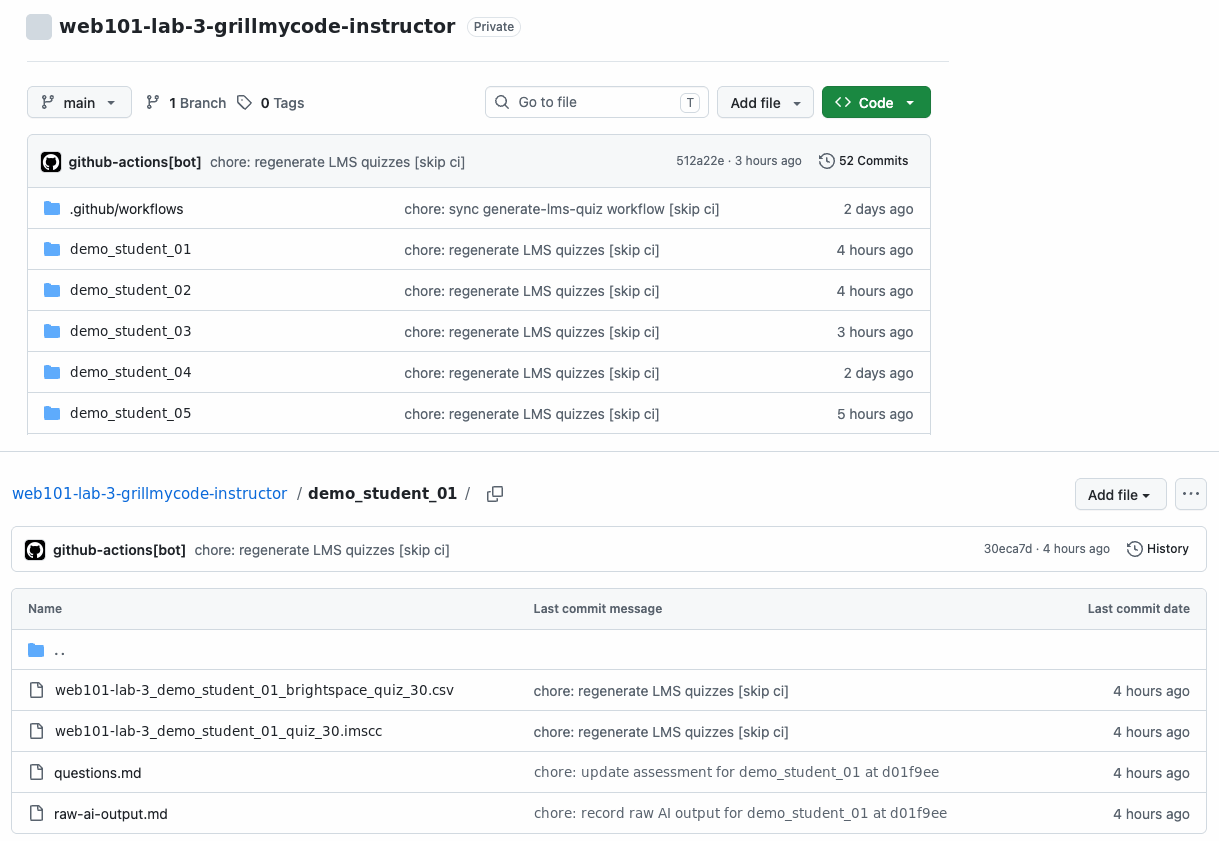
  5. That write automatically triggers the Generate LMS Quiz workflow in the instructor repository, which produces an IMS Common Cartridge / QTI quiz package ({student-login}/{assignment-name}_{student-login}_quiz.imscc) for that student, ready to import into any LMS that supports Common Cartridge — an open standard supported by most major platforms, including Brightspace, Canvas, Moodle, Blackboard Learn and Sakai. Brightspace users only also get an alternative: {student-login}/{assignment-name}_{student-login}_brightspace_quiz.csv, the same questions in Brightspace's own question-import format (see Which quiz file to use). It works only in Brightspace — anyone on another LMS can ignore it. Every run checks all students but skips any whose questions.md is unchanged since their quiz was last built, so normally only the student who just pushed gets a new file; a change to the quiz package format rebuilds every student's quiz in a single run. The workflow can also be run manually from the Actions tab to regenerate every student's quiz at once.

For subsequent students the repo already exists — the action just adds or updates their individual file.


Accessing the instructor repository

After the first student submission, find the instructor repository at:

https://github.com/{your-org}/{assignment-name}-grillmycode-instructor

Each student's assessment is stored in a dedicated folder:

README.md
{student-login}/
questions.md
{assignment-name}_{student-login}_quiz.imscc ← quiz package for any LMS
{assignment-name}_{student-login}_brightspace_quiz.csv ← optional alternative, Brightspace only

For example, if your org is my-school, your assignment is lab-3, and a student's login is jsmith:

  • Instructor repo: https://github.com/my-school/lab-3-grillmycode-instructor
  • Student file: https://github.com/my-school/lab-3-grillmycode-instructor/blob/main/jsmith/questions.md
  • Quiz package: https://github.com/my-school/lab-3-grillmycode-instructor/blob/main/jsmith/lab-3_jsmith_quiz.imscc
  • Brightspace-only CSV alternative: https://github.com/my-school/lab-3-grillmycode-instructor/blob/main/jsmith/lab-3_jsmith_brightspace_quiz.csv

Re-running the action (e.g. when a student pushes more commits) overwrites the existing file — there is always exactly one up-to-date assessment per student.

Which quiz file to use

The .imscc is the quiz file for everyone. Common Cartridge is an open standard from 1EdTech (formerly IMS Global), and most major LMS platforms can import it — including Brightspace, Canvas, Moodle, Blackboard Learn and Sakai. Whatever LMS you use, start with the .imscc.

Brightspace users: the CSV alternative

Not on Brightspace? Skip this section — use the .imscc and ignore the _brightspace_quiz.csv file. It is in D2L Brightspace's own question-import format, which no other LMS can read.

If you are on Brightspace, you can import either file. You only need one of them — they contain the same questions.

_quiz.imscc_brightspace_quiz.csv
Works inAny LMS that imports Common Cartridge, including BrightspaceBrightspace only
Imports asA ready-made quiz, titled {assignment-name} - {student-login}, limited to one attemptQuestions only — you add them to a quiz yourself
How to importImport the package into the courseOpen a quiz and choose Import → Upload a File, or upload to the Question Library

Using the CSV, questions are titled {assignment-name} - {student-login} - Q1, Q2, …, and answer options are already shuffled, since the CSV format has no shuffle setting. Leave the //gmc_content_hash line at the top of the file in place: Brightspace ignores it, and the workflow uses it to tell whether the file is up to date.


How the assignment and student are identified

Classroom 50 names every student repository <classroom>-<assignment>-<username> (lowercased), and gh student accept adds the accepting student to it as a direct collaborator. The action reads both names from those two facts and nothing else:

  • Student folder: the repository's direct collaborator whose login ends the repository name. For cs-principles-lab-3-jsmith with direct collaborator jsmith, the folder is jsmith/.
  • Instructor repository: everything before that login, so cs-principles-lab-3-grillmycode-instructor. The classroom slug stays attached, which keeps two classrooms running the same assignment in separate instructor repositories.
  • Team assignments: a team-mode repository ends in -group-<n> rather than a login, and its assessment is filed under group-<n>/.

Who pushed, who started the run, who authored the commits, and which template the repository came from play no part. Pushing a workflow file into a student's repository, or running the workflow by hand from the Actions tab, never changes where an assessment is filed. Each run logs what it resolved — look for Assignment: cs-principles-lab-3 · Submitter: jsmith in the Actions log.

If a repository does not fit — it was not created by Classroom 50, the student is no longer a direct collaborator, or more than one collaborator's login ends the name — the action does not guess. It skips instructor delivery, raises a workflow warning giving the reason, and repeats the reason in the run summary. The student's assessment issue and PDF are produced as normal.

Renaming an assignment with gh teacher assignment rename renames its student repositories too, so assessments made after a rename go to a new instructor repository named for the new slug.

:::note Upgrading from 1.2.8 or earlier Earlier releases named the instructor repository after the assignment's template repository when GitHub reported one, and could file an assessment under whoever pushed or started the run. Assessments now go to <classroom>-<assignment>-grillmycode-instructor. Any instructor repositories named after a template, or after a whole student repository (…-jsmith-grillmycode-instructor), are no longer written to and can be deleted once you have kept what you need from them. :::

Assignments without a starter repo

For an assignment registered without a template — or with --empty-repo — there is no template to ship the workflow from, so add the workflow file directly to each student repo. Instructor delivery works exactly as it does for a templated assignment.


Troubleshooting

Instructor repository delivery reports through annotations on the student's GrillMyCode run (Actions → the run → the summary page). The quiz workflow's own annotations are described in the instructor repository's README.md, under "Reading a run's annotations".

The run is green but nothing arrived in the instructor repository

This is the one to watch for. A delivery failure is raised as an error annotationFailed to write to instructor repository {org}/{assignment-name}-grillmycode-instructor: … — but it does not fail the job. The student's assessment issue and PDF are produced normally, so the run finishes successfully and no red X appears in the Actions list.

The reasoning is that a student should never see a failed assessment because of an instructor-side delivery problem. The trade-off is that the failure is easy to miss: open the run summary and read the annotations rather than trusting the green tick. The message names the underlying GitHub error — most often a token that has expired, lost access to the org, or cannot create repositories there.

Delivery is not retried out of band, but nothing is lost permanently: the next push from that student re-delivers their assessment in full.

Could not update .github/workflows/generate-lms-quiz.yml in …

The PAT cannot write under .github/workflows/, which needs the workflow scope (classic) or Workflows: Read and Write (fine-grained). The assessment itself still lands — only the sync of the action-owned files is skipped — so the repository keeps working with whatever version of the quiz workflow it was seeded with, and never receives later fixes. See Already have an instructor PAT? above for how to fix it.

The same warning naming README.md instead means a broader permission problem, since that file needs no special scope.

… was rate limited (403) / … hit a concurrent-write conflict (409)

Both are expected when a whole class pushes at once — every student's run commits to the same branch of the same repository. Each write is retried up to five times: conflicts re-fetch the file and retry with jittered backoff, rate limits wait for Retry-After/X-RateLimit-Reset (capped at 60 seconds per wait). A run that logs these warnings and then finishes has delivered successfully.

Only if all five attempts are exhausted does it become the error annotation described above — and the student's next push retries from scratch.

Timed out waiting for … default branch to initialise

Raised while creating a brand-new instructor repository, when GitHub's initial commit has not appeared after ten one-second polls. Rare, and self-correcting: the repository now exists, so the next student push takes the "already exists" path and delivers normally.

The first run after an upgrade regenerates every student's quiz

Expected, once. The quiz workflow decides what to rebuild by comparing a content hash stored inside each .imscc and .csv. A repository that has just received an updated workflow has no current hashes on file, so a single run rebuilds the package for every student, serialised by the workflow's concurrency group. For a class of thirty that is a long run, not a broken one — subsequent pushes go back to rebuilding only the student who pushed.

An older instructor repository has two quiz workflows

Repositories created before the workflow was renamed still contain .github/workflows/generate-brightspace-quizzes.yml alongside the generate-lms-quiz.yml the sync now adds. The sync never deletes files, so the old one stays.

It is harmless where it sits — it has no push: trigger, so it never runs on its own (which is why those repositories generated nothing on a student push before the sync existed). Dispatching it by hand from the Actions tab, though, runs the old generator without any of the current fixes. Delete it from the repository if you would rather not have it there; nothing in the action re-creates it.

The instructor repository is never created (personal accounts)

Automatic creation uses GitHub's create an organisation repository endpoint, so the owner of the student repositories must be an organisation. Under a personal account the creation call fails and the delivery is reported as the error annotation above.

To use the feature there anyway, create the repository by hand — named exactly {assignment-name}-grillmycode-instructor, private, initialised with a README so it has a default branch — and grant the PAT access to it. The action creates a repository only when one does not already exist, so every later run writes to yours and syncs the workflow into it as normal.


Setup summary

WhatWhenWhere
Create instructor PATOnce per orgGitHub → Settings → Developer settings
Add INSTRUCTOR_REPO_TOKEN org secretOnce per orgOrg → Settings → Secrets and variables → Actions
Add workflow file with instructor_repo_tokenOnce per assignmentAssignment's starter/template repo
Instructor repo createdAutomatically on first student submission{org}/{assignment-name}-grillmycode-instructor