Choosing a trigger
The trigger decides when GrillMyCode runs and generates questions for a student. There are three options. Whichever you pick, you can also start a run yourself at any time from the repository's Actions tab.
At a glance
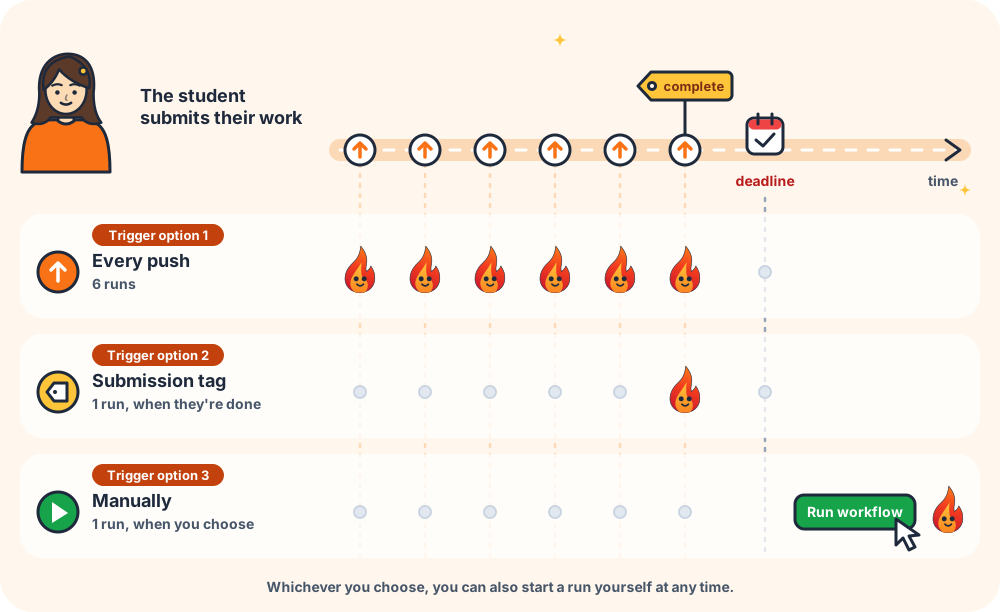
| Trigger | Runs when… | Best for | AI cost |
|---|---|---|---|
| Push | a student pushes code to the default branch (main) | Short assignments, and giving students questions to practise with while they work | One run per push |
| Submission tag | a student pushes a tag you named, such as complete or phase1 | Assessing finished work once, and projects handed in over several stages | One run per submission |
| Manual only | you click Run workflow | Deciding the timing yourself, such as one run after the deadline or a trial on a few repositories | One run per click |
Trigger option 1: Push
Every time a student pushes to the default branch, GrillMyCode generates a fresh set of questions about all of their work so far. The new questions replace the old ones in the same issue.
Choose this when:
- the assignment is short, finished in one sitting or over a few days
- you want students to see questions while they work, as practice or a self-check
- you want it to "just work" with no extra steps for students
Keep in mind:
- Students see the questions before they finish, so they have time to prepare their answers. That's good for practice, less so for a surprise oral check.
- A student who pushes 20 times gets 20 runs, so it costs more than the other two options on busy repositories. (If a student pushes again while a run is still going, the older run is cancelled.)
Recipe: Push to default branch.
Trigger option 2: Submission tag
Nothing happens on an ordinary push. GrillMyCode runs only when a student marks their work as done by pushing a tag, a label attached to a commit. You choose the tag names. The student runs:
git tag complete
git push origin complete
This is the right choice for phased work built up over a longer period, where each stage gets its own assessment. It is just as useful for a single final submission: one tag, one assessment of the finished work.
One final tag
Name a single tag, such as complete. The student is assessed once, on the work they chose to hand in, not on every half-finished commit along the way.
Choose this when:
- you want to assess the finished assignment, not work in progress
- you want to keep AI costs down on assignments where students push often
- you want students to make a deliberate "I'm done" step
Several milestone tags
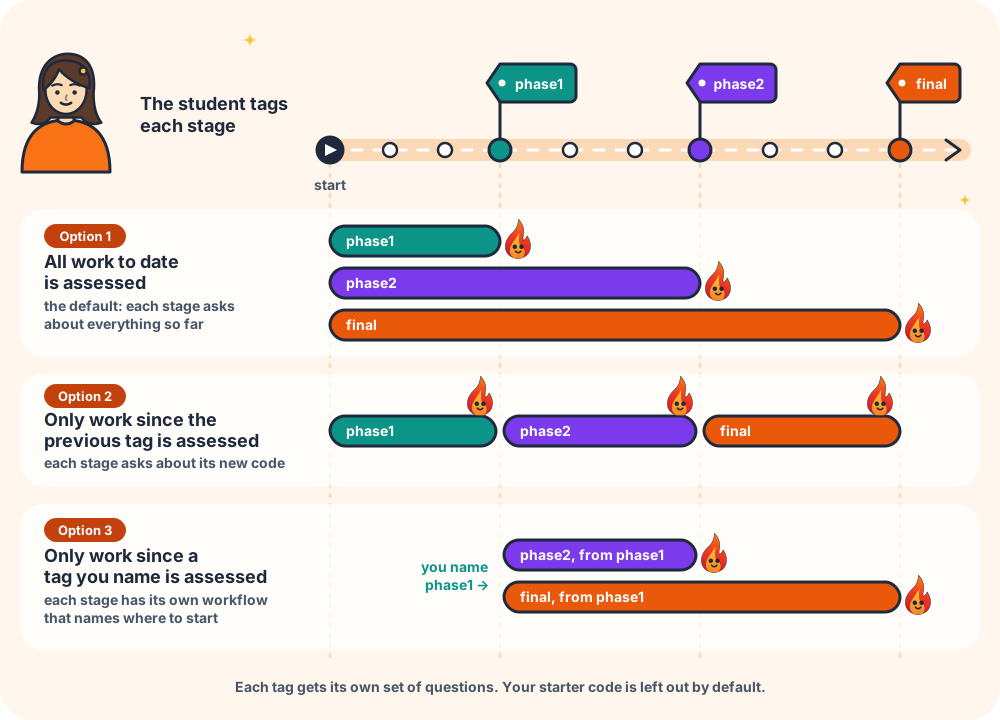
Name one tag per stage, such as phase1, phase2 and final. Each stage gets its own assessment issue, PDF and instructor-repository folder, so earlier stages are kept when later ones arrive.
Choose this when:
- a project is built and handed in in stages over weeks
- you want to check understanding at each checkpoint, not just at the end
You also choose what each later milestone covers:
| Setting | phase2 asks about… | Good for |
|---|---|---|
All work to date (cumulative, the default) | everything the student has written, including phase 1 | Checking the student still understands the whole project as it grows |
Only work since the previous tag (previous-tag) | just what changed after phase1 | Keeping each stage's questions focused on that stage's new code |
Only work since a tag you name (tag:phase1) | just what changed after the tag you name, and the run fails if that tag is missing | A separate workflow for each stage, each with its own instructions |
Keep in mind (for both kinds of tag):
- Only the tags you name count. GrillMyCode ignores every other tag, including the
submit/…tags Classroom 50 creates for its own grading — so on a Classroom 50 assignment,gh student submitalone does not generate questions. - Students need to know the tag commands. Put them in the assignment instructions, and ask students to type the tag names exactly:
Phase1andphase1are different tags. - The tagged commit must be on the default branch. A tag on any other branch fails the run, so the student can see their submission didn't count.
- To resubmit under the same tag, the student moves it to their latest commit and pushes it again:
git tag -f completethengit push --force origin complete. The new questions replace the old ones for that tag, but the resubmission is flagged to you and the replaced questions are kept (details).
Recipes: Submission tag · Milestone tags.
Trigger option 3: Manual only
GrillMyCode never runs by itself. You start each run from the repository's Actions tab (Actions → GrillMyCode → Run workflow).
Choose this when:
- you want to decide exactly when questions are generated, for example once, after the deadline, so no student sees their questions early
- you are trying GrillMyCode out on a few repositories before rolling it out
- you only want questions for some students, such as spot checks
Keep in mind:
- Runs are started one repository at a time, which takes a while for a large class.
- Nothing happens unless you remember to start it.
To change settings for a single run, see Running it yourself.
Can I use more than one?
Manual runs work alongside any trigger.
Push and submission tag don't mix well in one workflow: a student who pushes and then tags would be assessed twice for the same work, which is why the Workflow Wizard offers one or the other (Push, PR Merge, or Manual or Submission tag or Manual). If you really want both, for example practice questions on every push plus a formal assessment at the end, keep two separate workflow files, each with its own settings.
The Workflow Wizard asks which trigger you want on its Trigger step and builds the workflow for you.
Go deeper: Triggers in depth