Get started
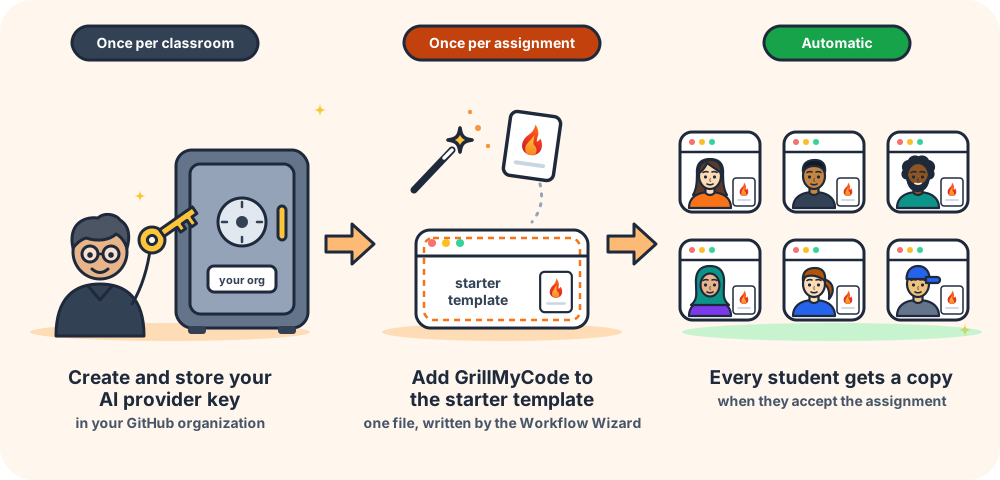
Setting up GrillMyCode takes about 15 minutes. The first step is done once for your whole classroom. After that, adding GrillMyCode to another assignment takes about a minute.
What you need
- Basic Git and GitHub skills. GrillMyCode lives in your students' repositories, so you should be comfortable committing and pushing changes, working with the default branch, and finding your way around a repository on GitHub: its files, issues and settings. If you use submission tags, you'll also need to create and push tags. These pages explain the GitHub Actions parts as they come up. New to Git? GitHub's Start your journey guides cover the basics, and Pro Git explains tagging.
- A Classroom 50 classroom, with permission to change its GitHub organization's settings. Organization owners have this.
- The assignment's template repository, with permission to commit to it.
- An OpenRouter account with a little credit. A small budget is enough for a large class for a semester with the recommended models, though cost can vary widely depending on the model you choose. Step 1 walks you through it.
The four steps
- Set up an OpenRouter key. Once per classroom.
- Build your workflow with the Workflow Wizard.
- Add it to your assignment by committing one file to the template repository.
- Check the first run to make sure everything worked.
Prefer to write the workflow yourself?
This is the smallest working workflow. It runs on every push to the main branch and whenever you start it from the Actions tab. Complete step 1 first, then commit this file to the assignment's template repository.
.github/workflows/grill-my-code.yml
name: GrillMyCode

on:
  push:
    branches: ["main", "master"]
  workflow_dispatch:

# A new push cancels any run still in progress for the same branch,
# so only the latest commit is ever assessed.
# Do not modify this setting unless you have a compelling reason to.
concurrency:
  group: grillmycode-${{ github.workflow }}-${{ github.ref }}
  cancel-in-progress: true

jobs:
  generate-questions:
    runs-on: ubuntu-latest
    timeout-minutes: 15
    permissions:
      contents: write  # gmc-assessments release + PDF asset
      issues: write    # assessment issue
    steps:
      - uses: actions/checkout@v6
        with:
          fetch-depth: 0    # full history required for diff resolution

      - uses: NSCC-ITC-Assessment/GrillMyCode@v0
        with:
          github_token: ${{ secrets.GITHUB_TOKEN }}
          api_key: ${{ secrets.OPENROUTER_API_KEY }}
          # The workflow's name above is its set of questions: rename a copy
          # of this file to give it an issue, PDF and folder of its own.
          question_set: ${{ github.workflow }}
          # If desired, uncomment this input and edit to use a different one —
          # any model from https://openrouter.ai/models (provider/model-name).
          # ai_model: "google/gemini-3.5-flash-lite"
Every setting is described in Inputs and outputs, and the workflow recipes have ready-made variations.