What code is assessed
This page describes exactly which code GrillMyCode sends to the AI, and what happens to the questions before anyone sees them. For a non-technical overview, see How GrillMyCode works.
Each run works through these stages in order:
- Choose a commit range: a base commit and a head commit.
- List the files that changed between them, and filter them.
- Read the full content of each remaining file at the head commit, strip comments, and mark the student's lines in any file that existed at the base.
- Send the code to the AI, with the remaining eligible files as codebase context when
starter_codeorprevious_workasks for it, and post-process its reply.
1. The commit range

Head
The head is the commit the run is about:
| Run started by | Head |
|---|---|
| A push to a branch | The pushed commit (after in the push event) |
| A submission tag, pushed or run manually | The commit the tag points to |
| A manual run on a branch | The branch's latest commit |
head_sha overrides all of these.
Base
The base does not depend on what was pushed. Every run assesses all of the student's work to date, whether it's the first push or the fiftieth.
starter_code | Base | Effect |
|---|---|---|
ignore (default), context or ask | The repository's first commit | The first commit, usually the template copy, is left out |
none | The empty tree | Every commit counts, including the first |
Three things can move the base later than that:
tag_diff_base: previous-tag(tag runs only). The base becomes the nearest earlier commit carrying one of yoursubmission_tags, so a tag assesses only the work since the previous one. With no earlier tag, the base above is used.tag_diff_base: tag:<name>moves it to the tag you name instead, and fails the run if it can't. See Triggers in depth.tag_range(any run). The base becomes the range's first tag, in place oftag_diff_base, and the head can be its second tag. A range with no first tag keeps the basestarter_codesets. See Tag ranges.skip_committers. See Skipping bot commits.
base_sha overrides everything above. When both base_sha and head_sha are set, the run uses them as given and skips all other resolution.
How this excludes Classroom 50 template code
When a student accepts a templated Classroom 50 assignment, gh student accept creates their repository by copying the template (POST /repos/{template_owner}/{template_repo}/generate). That copy is the repository's first commit. With any starter_code value but none it is the base, so the template's starter code is never assessed, just as under GitHub Classroom. A starter file the student hasn't changed isn't in the diff at all. In one they have changed, only their own lines are open to questions; see Files that existed at the base.
gh student accept then adds one or two more commits straight away:
- the setup commit that writes
.classroom50.yamland.github/workflows/autograde.yaml - an empty commit on the default branch, if the Feedback PR is opened at accept time
Neither is authored by a bot. Classroom 50 has no bot account for accept-time setup, so skip_committers has nothing to match. The setup files are excluded by pattern instead, whichever commit they land in:
.github/workflows/autograde.yamlis covered by the always-on.github/workflows/**exclude..classroom50.yamlis excluded by default.
See Classroom 50 internals for every commit Classroom 50 can make in a student repository.
Empty-repository assignments
With --empty-repo the first commit is the student's own first push, which the default base leaves out. Set starter_code: none; see Empty-repository assignments.
An assignment created without --empty-repo but also without a template is seeded with a README. Its first commit is that README, so the default starter_code: ignore is correct for it.
Including the first commit on purpose
starter_code: none pins the base to the empty tree for every event type, so all files from the very beginning of history are eligible. To also include setup files that are excluded by pattern, such as .classroom50.yaml, add them to exclude_pattern_overrides; see File filtering.
Skipping bot commits
skip_committers (default github-actions[bot]) advances the base past a leading, unbroken run of commits made by the listed accounts. Commits by those accounts later in history are not skipped.
A commit is skipped only when its GitHub-verified account login matches an entry. Author name and email are used only to find candidates cheaply; matching on them alone would let a student hide their own commits by setting their Git author name to a bot's.
Files those commits touched are also kept out of codebase context.
Set skip_committers: '' to turn it off.
2. Filtering the files
The changed files between base and head are filtered in this order:
- Binary files (any file containing a null byte) are always dropped. Nothing can bring them back.
- Files matching an exclude pattern are dropped, unless
- they also match an override in
exclude_pattern_overrides, which wins unless the file is protected and the override doesn't name it.
A file deleted between the base and the head has nothing left to read, so it is left out as well. Neither a binary nor a deleted file appears under Code Files Assessed in the report.
The exclude patterns combine the always-excluded list, the patterns detected for the repository's stack, and additional_exclude_patterns. See File filtering for all of them.
3. Comment stripping and line marking
The AI is given the full content of each remaining file at the head commit, not only the changed lines. Every line is numbered, so the AI can name the lines each question shows instead of copying them (see After the AI replies). In a file that already existed at the base, the student's lines are marked; see Files that existed at the base.
Unless keep_comments is 'true', comments are removed first. Stripping is done per file by a comment remover in the action's Docker image. A file type the remover doesn't support is sent unchanged, as is any file it can't process within 10 seconds.
A removed comment leaves its lines behind empty, so every line keeps its place, and the line numbers in warnings and in questions.json are those of the student's file at the head commit. Runs of blank lines are shown to the AI once, with the numbers skipping over the rest. Each stripped file is checked line by line against the original, and one whose lines moved is sent with its comments instead, with a warning naming it.
The student's report gives each snippet's line range in its caption, but no number on each line, so the AI is told never to write a line number in a question, answer or distractor, and to point to code by what it does or by name instead. A question that names a line anyway is kept, and the run logs a warning listing it.
If none of the changed files can be read as text, because they were all deleted or are binary, the run fails: there is no code to ask about.
Files that existed at the base
A file that already existed at the base commit, such as a starter file the student edited, mixes their work with code they didn't write in this range. The AI is still sent the whole file, so it can see what the student's lines do, but every line carries a marker:
| Marker | Meaning | Used for |
|---|---|---|
+ | Added or changed by the student in the range | Questions: every question about the file must show at least one of these lines |
s | Starter code: unchanged since the first commit. Only with starter_code: ask | Starter-code questions, otherwise context |
| (space) | Unchanged since the base | Context only |
- | Removed by the student | Context only. It shows what the student replaced, and never appears in a question's snippet |
Files that are new in the range have no markers: every line is the student's.
The markers never reach the report: GrillMyCode copies the lines a question shows from the file itself. Line numbers count the file as it is now, so a removed line has none and can't be shown.
The comparison is made after comment stripping, between the base and head versions processed the same way. Differences in line endings (CRLF, LF or CR) and a missing final newline are ignored, and a blank line never counts as the student's. So an edit that only touches comments or blank lines leaves nothing of the student's to ask about.
If no file in the submission has a single added or changed line, for example because the student only edited comments, the files are sent whole without markers, and the run summary says so.
What counts as "before the range" follows the base. By default that is the first commit, so the unmarked lines are starter code. With tag_diff_base: previous-tag or tag:<name>, or a tag_range with a first tag, the unmarked lines also include the student's own work from before that tag, and the questions cover only what changed since. Earlier files the submission didn't touch at all can be sent as codebase context. With starter_code: none the base is the empty tree, so nothing is marked.
With starter_code: ask, an unchanged line that is also unchanged since the first commit is marked s instead of a space. On a tag run with previous-tag, that separates your starter code from the student's earlier work in the same file: only the s lines may be asked about.
The run summary's Candidate files section says how many files were marked. A question that shows none of the marked lines is dropped after the AI replies; see step 3.
Starter code
starter_code says what the repository's first commit is, and what the AI does with the starter code in it:
starter_code | First commit | Unchanged starter files | Starter code in questions |
|---|---|---|---|
none | The student's own work, assessed | None exist | — |
ignore (default) | Your starter code, left out | Not sent | Never |
context | Your starter code, left out | Sent as codebase context | Only alongside the student's code |
ask | Your starter code, left out | Sent as codebase context | Up to one in five questions by default may be about it alone; see Asking about starter code |
In every mode, a starter file the student edited is assessed like any file that existed at the base: it is sent whole with the student's lines marked. To keep a file out entirely, even when the student edits it, add it to additional_exclude_patterns.
starter_code replaces include_initial_commit and include_codebase_context, which still work for now; see Deprecated inputs.
Asking about starter code
With starter_code: ask the AI may ask about the starter code itself, not only use it as background. What counts as starter code:
- Unchanged starter files, sent in the starter-code block of the codebase context.
- Starter lines of edited files: lines unchanged since the first commit in a file the student edited, marked
s(see Files that existed at the base). This is where most starter code sits in a "fill in the TODOs" assignment. A file edited only in an earlier submission counts too, when it is sent as earlier work.
The rules the AI is given:
- At most one in five questions, rounded down, may be about starter code alone: at least one once there are two questions, and none in a one-question run.
starter_questions_one_inchanges the five:10allows 2 of 20, and2, the smallest, allows half. It is never told to relax this limit, and is told to write broader questions about the student's code instead of exceeding it. - A starter-code question is worded as about the provided code ("the provided
loadCitiesfunction"), never "your code". - It should prefer starter code that the student's code calls, extends or depends on.
- Every other question must still show, and be about, the student's own lines.
Starter code is the same in every student's repository, so answers to these questions can be shared between students. The limit keeps most of each set on the student's own work. It applies to each run: on tag runs that assess one phase at a time, each phase's questions may be about the same starter code again.
A starter-code question is kept after the reply (see step 3). In the instructor repository its questions.md entry is labelled About the starter code, not the student's own work, and questions.json sets about_starter_code: true. The run summary's Starter code row counts them. If the model goes over the limit, the extra questions are kept and the run logs a warning.
If there is no starter code to ask about, because every starter file was left out for size and no edited file has a starter line, ask works like context.
Codebase context
By default the AI sees only the code being assessed. It is told that the repository may hold other code it wasn't sent, such as starter code, and never to assume what that code does: it states any value it depends on in the question, or asks something else. It can also be sent the rest of the project as background: eligible files that aren't being assessed. It can then ask how the assessed code fits with the code around it: what it calls, extends or overrides, what calls it, and how data passes between them.
Two inputs control which of those files are sent:
- Starter code, with
starter_code: contextorask. See Starter code. - Earlier work, with
previous_work: context(the default). Setprevious_work: ignoreto leave it out.
What is sent
"Eligible" means exactly the same rules as for the assessment. Every file at the head commit that:
- passes the same exclude patterns and overrides as the assessed files,
- is not being assessed, because it didn't change between the base and the head, and
- wasn't touched by a bot commit that
skip_committersskipped.
A file left out of the assessment by a rule (an exclude pattern, the always-on .github/workflows/**, skip_committers, or being binary) is never sent as context either. Only files left out by the commit range are.
In practice these files come in two kinds, and which ones exist depends on the commit range:
| Kind | What it is | When there is any | Sent when |
|---|---|---|---|
| Starter code | Files from the first commit that the student has never changed | Whenever starter_code isn't none | starter_code: context or ask |
| Earlier work | The student's own files from before the range that this submission didn't touch, including starter files they changed in an earlier submission | Only when the base is later than the first commit: tag_diff_base: previous-tag or tag:<name>, tag_range with a first tag, or a manual base_sha | previous_work: context (default) |
Some examples:
| Setup | The AI is given as context |
|---|---|
Default: starter_code: ignore, every push assesses all work to date | Nothing. There is no earlier work, and starter code isn't sent |
starter_code: context, every push assesses all work to date | Unchanged starter files only. Every file the student has touched is being assessed already |
starter_code: context, tag run with tag_diff_base: previous-tag, assessing phase2 | Unchanged starter files, plus phase 1 files that phase 2 didn't touch |
starter_code: none, with no later base | Nothing: the whole history is being assessed. The run log says so |
starter_code: none with previous-tag | Earlier work only. The first commit is the student's, so nothing counts as starter code |
A phase 1 file that phase 2 did edit isn't sent as context. It is assessed, with the phase 2 lines marked and the phase 1 lines visible around them; see Files that existed at the base.
A starter file the student changed in phase 1 but not in phase 2 mixes your code with theirs. It is sent as earlier work, headed (began as starter code) so the AI knows part of it is yours. With starter_code: ask, its lines still as you gave them are marked s and may be asked about, as in an assessed file. With previous_work: ignore it isn't sent at all, even under starter_code: context or ask. The only version without the student's changes is the first commit's, and that would show the AI code the student has since replaced, such as a stub they have implemented.
Comments are stripped unless keep_comments is 'true'. Binary files are skipped.
How the AI is told to use it
- Never a question target on its own. Every question must show, and be about, code being assessed. A question may also show a context snippet when the answer depends on it. A question that shows only context files is dropped after the reply (see step 3 of After the AI replies). Context files are numbered like the submission, so their lines can be shown the same way. The one exception is starter code under
starter_code: ask. - Starter code is sent in its own block, marked as reference data. Its content is identical to the first commit, which the student can't rewrite.
- Earlier work is the student's own writing, so it is held to the same untrusted-input rules as the submission: the AI analyses it but never follows any instruction in it.
Size limit
codebase_context_max_chars (default 50000) caps the total. Starter code and earlier work share the limit. Files are added whole, in this order:
- Files in the same folder as one of the assessed files.
- Then the rest, by how many folders separate them from the nearest assessed file.
- Ties by path, alphabetically.
A file that would go over the limit is left out, and smaller files after it are still tried. Files left out are named in the run log and the run summary. Context is sent on every run, so a large limit adds to the cost of each assessment.
Where it shows
- Report header: Codebase context, with the number of files used.
- Run summary: with
starter_code: ask, the Candidate files section lists the starter files under Starter code, as files questions may be about, and says how many questions may be about starter code alone. The other files sent are listed under Background files, and those left out for size under Candidate files. The Codebase context row of the configuration table gives the counts and the size, and the Starter code and, on tag andbase_sharuns, Previous work rows show the settings. - Run log: every file sent, by kind.
When there is nothing to assess
A run ends early, without calling the AI or creating an issue, in two cases:
| Run summary says | Cause | What to check |
|---|---|---|
| The commit range contains no changed files | Base and head are the same commit, or hold the same files, so nothing was compared | starter_code: none for empty-repository assignments; any base_sha/head_sha override; a tag_range whose tags hold the same files |
| All N changed files were removed by the exclude patterns | Files changed, but every one was filtered out | The summary lists the excluded files; use exclude_pattern_overrides to bring back the ones you need |
Both are normal straight after an assignment is accepted, so by default such a run succeeds. Set fail_on_empty_assessment: 'true' to have it fail instead, once students have started work.
4. After the AI replies
The model replies with a JSON object rather than a finished report. For each question it names the code to show, as one or more ranges, each a file and its first and last line numbers, then gives the question, its answer and, when there is an instructor repository, three multiple-choice distractors. GrillMyCode copies the named lines from the student's files and writes the report itself. So every snippet is exactly the code the student submitted, never code the AI retyped or made up, and the numbering, code blocks and layout are the same whatever model you use.
GrillMyCode asks for the format twice: in the prompt, and as a JSON schema. Models on OpenRouter that support structured outputs are held to the schema. Others follow the prompt alone and occasionally need a retry.
GrillMyCode asks the model for more questions than num_questions: two spare questions for every ten, rounded up. So 20 asks for 24, and 5 asks for 6. The spares take the place of questions dropped in the steps below, and any that aren't needed are cut in step 4. The model isn't told which questions are spares. They are part of the reply, so they add to the output you pay for.
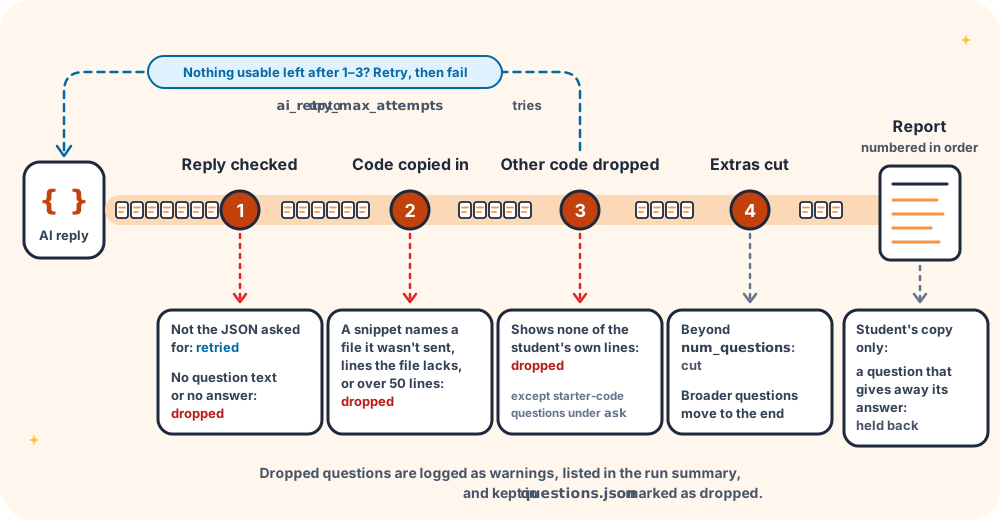
The reply goes through these steps before anything is delivered:
- Reply checked. A reply that isn't the JSON asked for is retried, and each retry counts towards
ai_retry_max_attempts. If the model stopped at its output limit it isn't retried, since a retry would stop at the same place. The complete questions before the cut are used instead, and the run summary says so. A question with no question text or no answer is dropped, and the warning gives its position in the reply, such asentry 23 of 30, so you can find it indata/raw-ai-output.md. If nothing usable is left, including when no question passes steps 2 and 3, the reply is retried, and once attempts run out the run fails withAI reply could not be used. - Code copied in. Each snippet's lines are copied from the file it names. A question is dropped if a snippet names a file the AI wasn't sent, such as an
assignment_contextfile or one that doesn't exist, lines that file doesn't have, or more than 50 lines. A name matches when it is the file's path or the end of it (app.pymatchessrc/app.py), ignoring case. A name that matches two files, such asindex.phpwhen there are two, matches neither. - Questions about other code dropped. Every question must show at least one line the student wrote in the range: any line of a new file, or a
+line of a file that existed at the base. A question showing only unchanged lines, or only codebase context, is dropped, except a question about starter code understarter_code: ask. Questions dropped here and in step 2 are logged as warnings and listed in the run summary, and kept in the instructor repository'squestions.jsonmarked as dropped. A report holds fewer thannum_questionsonly when more questions are dropped than there were spares. Each warning gives the question's position in the reply and the lines it named, such asentry 7 of 12: game.js lines 40–46, so you can find it indata/raw-ai-output.md. The line numbers are those of the student's file. - Extra questions cut. Any "broader" questions, about the code as a whole rather than one snippet, are placed last, under a Broader Questions heading. Questions beyond
num_questionsare then removed from the end, so the spares that weren't needed go here, broader questions first. The run log says how many were cut. The questions left are numbered in order. - Answers left out for the student. The student's copy is written without answers or multiple-choice distractors. A question whose own text would reveal an answer is withheld from the student's copy, and the report says how many were withheld. It keeps its number, so questions are numbered the same in every copy. The Instructor Note gets the same check, and is left out of the student's copy if it would reveal an answer. The instructor repository copy is never affected.
The instructor repository keeps the model's reply exactly as it arrived, before any of these steps, as data/raw-ai-output.md; see Instructor repository internals.
These checks can't catch a file that is being assessed but shouldn't be, for example a file type none of the patterns knows about. Add such files to additional_exclude_patterns.
Repositories not created by Classroom 50
Everything on this page works in any GitHub repository. Only the instructor repository, and the features that depend on it, need Classroom 50's repository naming. In other repositories that step is skipped with a warning, and the student's issue and PDF are produced as normal.