Step 3: Add it to your assignment
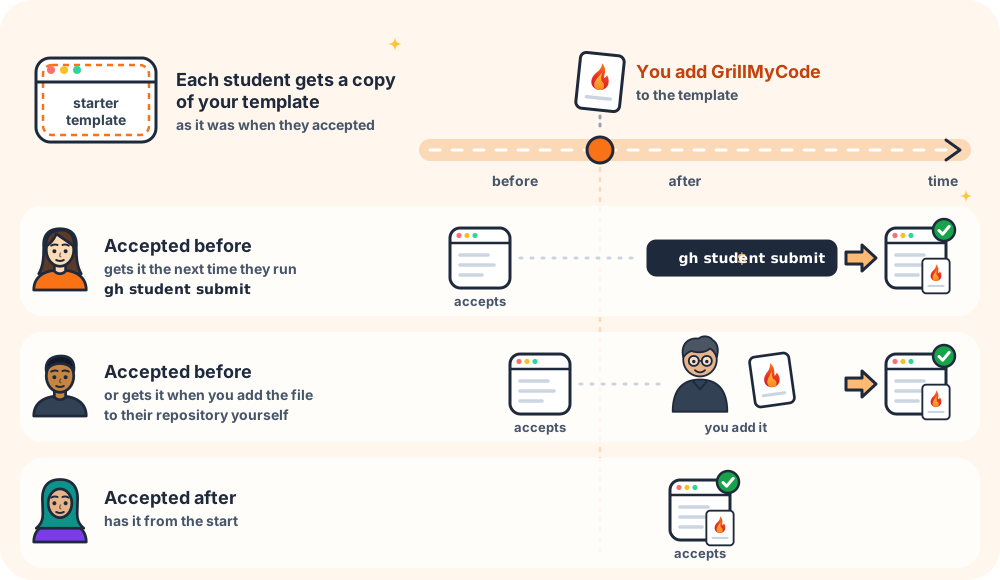
Students get GrillMyCode the same way they get your starter code: from the assignment's template repository. When a student accepts the assignment, their repository starts as a copy of the template, workflow included.
Commit the workflow to the template
- On GitHub, open the assignment's template repository. This is the repository you registered with
gh teacher assignment add --template. - Select Add file → Create new file.
- For the file name, type
.github/workflows/grill-my-code.yml. Typing the slashes creates the folders for you. - Paste the workflow you copied from the Wizard.
- Select Commit changes and commit to the main branch.
From now on, every student who accepts the assignment gets GrillMyCode.
The template may also contain .github/workflows/autograde.yaml, or Classroom 50 may add it. That file belongs to Classroom 50. Put GrillMyCode in its own file, as above, and don't edit autograde.yaml.
Students who have already accepted
A student repository is a copy of the template at the moment the student accepted, so repositories created before you added the workflow don't have it. They can get it in two ways:
- Classroom 50 copies the template's
.githubfolder again each time a student runsgh student submit, so those students pick up the workflow on their next submit. - You can also add the same file to their repositories yourself.
Assignments without a template
If you created the assignment with --empty-repo, there is no template to copy from, and one setting needs changing. See Empty-repository assignments.